

如果你的网站被 Facebook 屏蔽,分享 URL 时会出现以下错误:“Your message couldn't be sent because it includes content that other people on Facebook have reported as abusive”:
要修复它,请前往 Facebook 分享调试工具 识别问题。只需输入你的域名并点击 Debug:
然后根据调试结果,按以下选项操作:
选项 1 – 网站不符合社区标准
网站 URL 被屏蔽最常见的原因是它不遵循 Facebook 的 社区标准,因此请务必彻底检查。
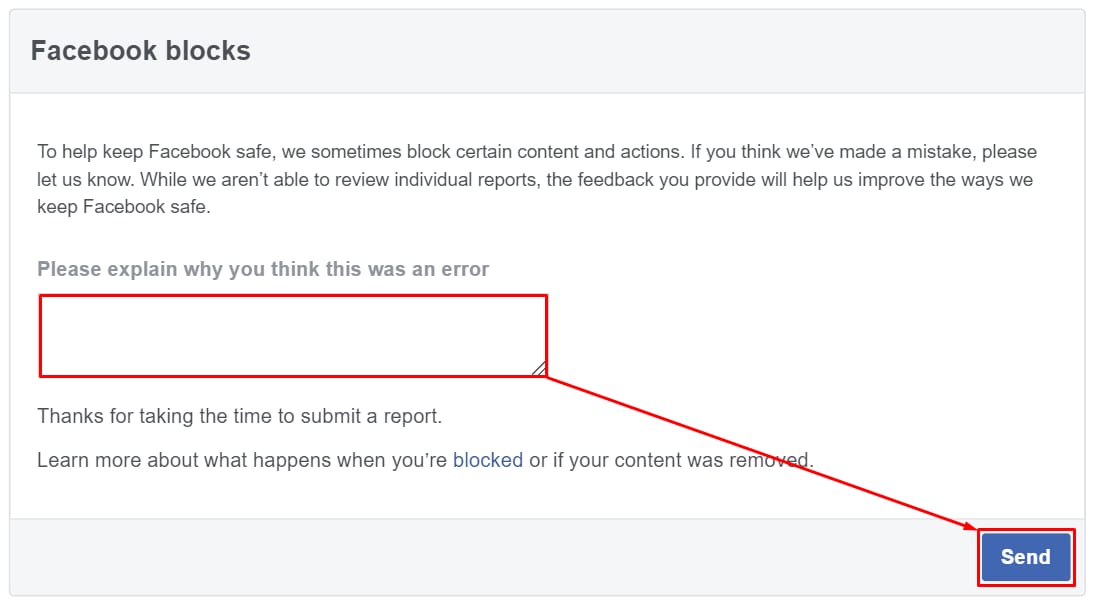
一旦你确认网站未违反任何标准,或已移除 Facebook 认为不适当的内容,点击 let us know 并请求审核:
这会带你到一个表单,你可以提交简短说明,解释为什么你的网站应该被解除屏蔽:
提交此表单后,请等待几天,直到 Facebook 审核你的报告。
选项 2 – 应修复的警告
如果调试后出现 Warnings That Should Be Fixed 标签页,说明你的网站某个特定 URL、其内容或一般开发存在问题。例如:
如果你不擅长网站开发,可以考虑 聘请专业开发者 来处理此过程,或在专门论坛(如 StackOverflow)上研究——它是获取开发支持的绝佳场所。
修复所有报告的问题后,你可以请求 Facebook 重新抓取该 URL:
抓取完成后,你就可以使用 Facebook 分享你的网站了 😊



来源:Hostinger 官方帮助文档