How to Access Hostinger Account From a Mobile Device
How to Access Hostinger Account From a Mobile Device
Logging in to your Hostinger account using a tablet or mobile
You can access your Hostinger account at any time through your phone or tablet web browser. It is effectively optimized and well-suited for mobile devices.
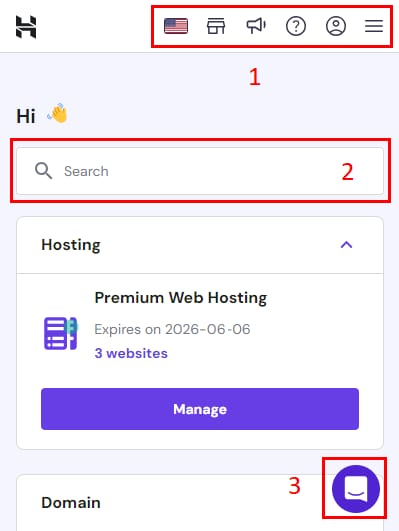
You will find the same sections as the desktop version, with an adapted layout. Let's see the Home section:
- Top bar — include the same options as our desktop version. Click on the icon to the right to access all the other sections.
- Search bar — easily locate your services by searching by a domain name.
- Contact our Customer Success team.
Hostinger's hPanel does not have a mobile control panel or email application. To ensure your security, avoid downloading any unverified applications.
That's it! Now you know how to access and navigate your hPanel from a mobile device.
来源:Hostinger 官方帮助文档