为 Hostinger 的 cPanel 邮箱启用 catch-all 功能
Catch-all 邮箱是一种便捷的方式,用于接收发送到你域名下错误或无效邮箱地址的任何邮件,例如,如果你有 support@domain.tld,而发件人写成了 suport@domain.tld。
如何创建 Catch-All
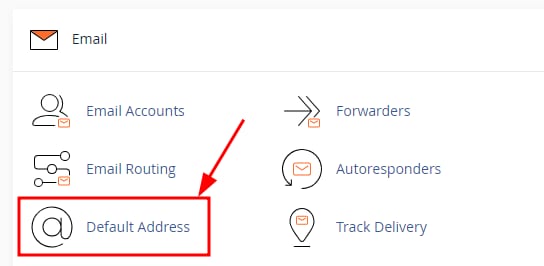
进入 cPanel 的 Email 板块并找到 Default Address 选项:
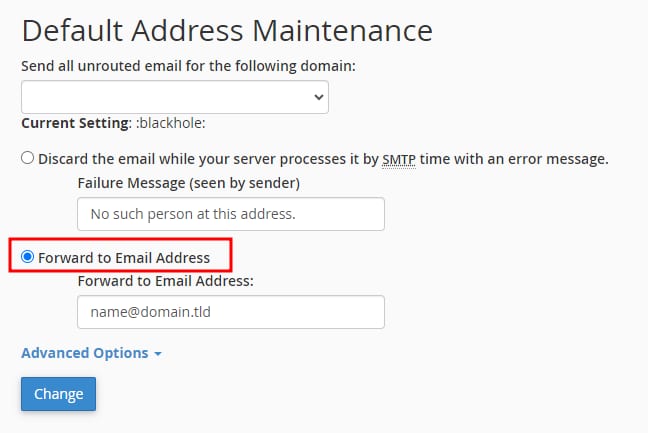
在新页面中,从下拉菜单中选择域名,勾选 Forward to email address 选项,并输入邮件将被转发到的邮箱:
确认无误后,点击 Change,catch-all 即会创建。
如何删除 Catch-All 邮件
在 Default Address 板块,根据你的偏好将设置更改为以下之一:
- Discard with a message – 向发件人发送消息,在 Failure Message 中指定要发送的内容
- Discard without notification – 展开 Advanced Options 找到 Discard (Not Recommended) 选项
接着,点击 Change 更新此设置。如有需要,你可以随时创建新的 catch-all。
来源:Hostinger 官方帮助文档