通过 cPanel 更改 PHP 版本
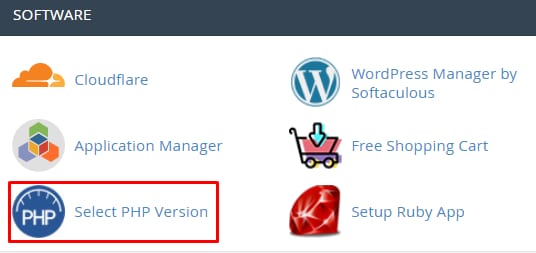
你可以随时更改主机账户的 PHP 版本,只需访问 cPanel → Software 板块 → Select PHP Version:
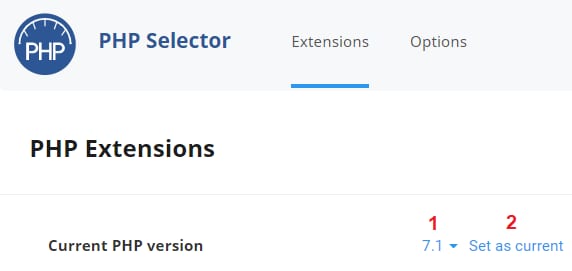
在打开的新页面中,选择你想要使用的 PHP 版本并点击 Set as current:
完成!现在你知道如何更改 PHP 版本了 😊
注意:
来源:Hostinger 官方帮助文档
通过 cPanel 更改 PHP 版本
你可以随时更改主机账户的 PHP 版本,只需访问 cPanel → Software 板块 → Select PHP Version:
在打开的新页面中,选择你想要使用的 PHP 版本并点击 Set as current:
完成!现在你知道如何更改 PHP 版本了 😊
注意:
来源:Hostinger 官方帮助文档