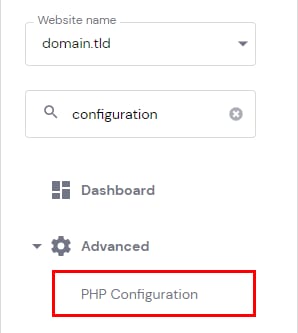

Hostinger hPanel sidebar with PHP Configuration option highlighted under Advanced
Hostinger hPanel PHP extensions tab next to PHP version and PHP options tabs

在 Hostinger 中管理 PHP 扩展和选项

以下信息不适用于使用 Hostinger 网站构建器 创建的网站 💡

要管理网站的 PHP 扩展和选项,请进入 网站 部分,点击相应网站旁边的 面板(Dashboard)。然后,在侧边栏中搜索 PHP 配置(PHP Configuration) 并点击对应结果以进入这些设置:

PHP 配置 页面,打开所需的标签页 —— PHP 扩展或 PHP 选项:

PHP 扩展
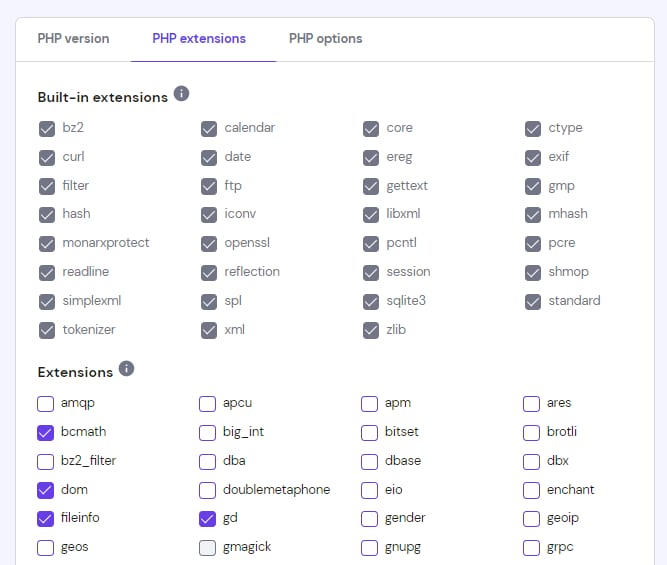
Hostinger PHP extensions tab with bcmath, dom, fileinfo, and gd selected
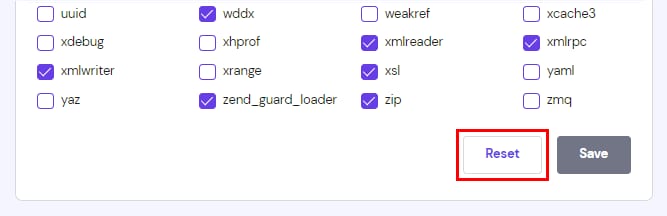
PHP extensions settings with the Reset button highlighted near Save

在页面顶部,你会找到当前 PHP 版本自带的 内置扩展(Built-in Extensions) 列表。这些扩展无法禁用。在其下方,你会找到所有已安装扩展的列表,并可根据需要启用或禁用它们:

可用的 PHP 扩展取决于网站当前的 PHP 版本 💡

进行任何更改后,请记得点击页面底部的 保存(Save) 来保存更改。

要将所有值重置为默认值,请点击页面底部的 重置(Reset)

PHP 选项

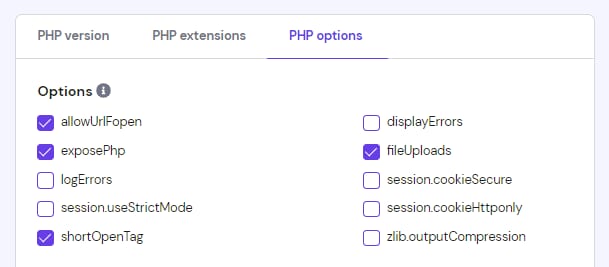
Hostinger PHP options tab showing checkboxes for allowUrlFopen, exposePhp, and shortOpenTag enabled

在页面顶部,你会找到基本选项列表,可根据需要启用或禁用:

在其下方,你会找到可以编辑的参数。例如,已禁用函数列表。在那里,你可以更改某些限制的值,这些限制默认设置为你的主机套餐可用的最大值。

来源:Hostinger 官方帮助文档