你可以使用 phpMyAdmin,从托管在 Hostinger Web、Cloud 或 Agency 托管计划上的自定义 PHP 或 HTML 网站中轻松导出数据库。当你需要在本地备份数据或迁移网站时,此过程非常有用。
开始之前
本指南适用于 Web、Cloud 和 Agency 托管计划上、与自定义 PHP 或 HTML 网站关联的数据库。
-
Hostinger 网站构建器(Website Builder)不支持数据库。
-
Hostinger Horizons 不使用 phpMyAdmin,而是使用集成的后端。
第 1 步——在 phpMyAdmin 中打开数据库
-
进入 hPanel Websites,点击网站旁的 Dashboard(仪表盘)。
-
在侧边菜单中,选择 Databases → Management(管理)。
-
点击 Enter phpMyAdmin(进入 phpMyAdmin)。
如需更多进入 phpMyAdmin 的方式,请参考此指南:如何访问 phpMyAdmin。
第 2 步——开始导出

-
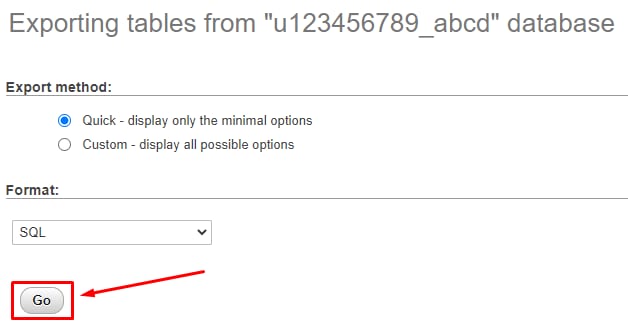
点击 phpMyAdmin 顶部工具栏上的 Export(导出) 按钮。
-
若要以 SQL 文件格式导出数据库(这是迁移数据库的标准格式),向下滚动并点击 Go(执行)。
-
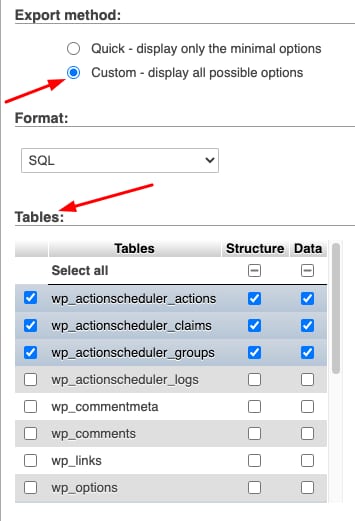
如果你有特殊需求(例如不同的文件格式,或仅导出选定的表),请选择 Custom(自定义)导出 方式,调整设置后点击 Go(执行)。
-
数据库的副本会自动下载到你的本地设备。
注意
- 如果在使用 phpMyAdmin 时遇到问题,可以尝试 通过 SSH 导出数据库。
来源:Hostinger 官方帮助文档