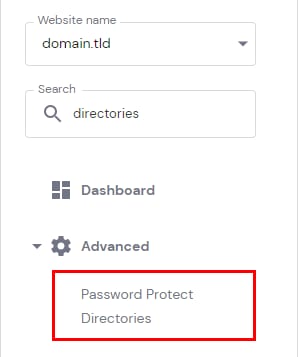
Hostinger control panel with the Password Protect Directories menu item highlighted
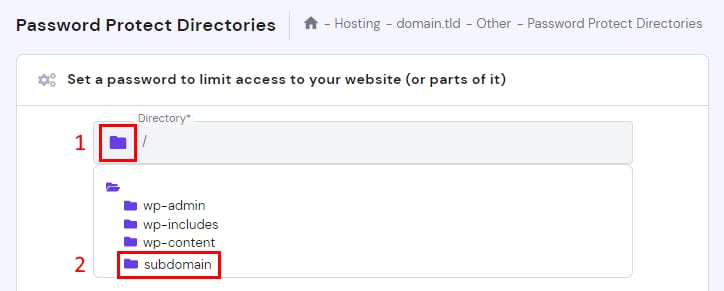
Hostinger hPanel password protect directories screen with the subdomain folder highlighted in the directory list
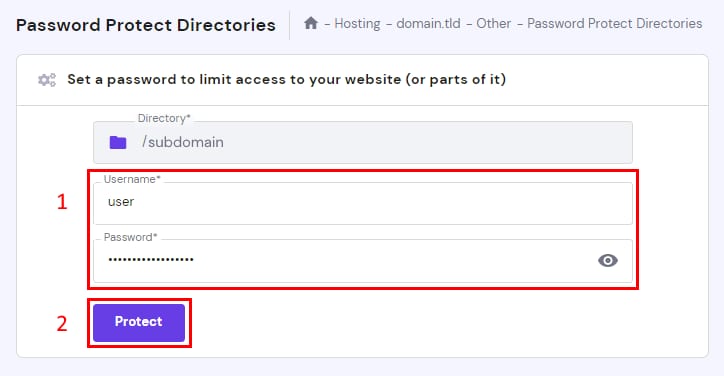
Hostinger password protect directories form with username and password fields, plus Protect button
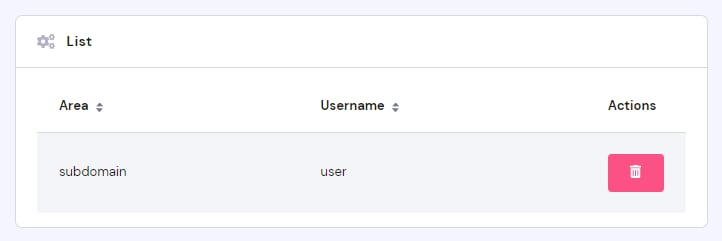
Hostinger list showing a subdomain entry with username and delete action button

了解获得访问权限的用户可以在您的账户上执行哪些操作,以及不能执行哪些操作。

获得访问权限的用户可以做什么?

获得访问权限的用户可以管理更改您的网站,包括:

✅ 修改文件和数据库

✅ 更改您控制面板中与托管相关的设置

哪些操作受到限制?

为了确保您账户的隐私和安全,获得访问权限的用户不能执行以下操作 👇 ❌

  • 管理或向您的账户添加支付方式

  • 邀请他人访问该账户

  • 查看或更改个人资料信息(例如更改电子邮件、姓名、电话、地址和密码)

  • 域名执行以下任务:转移或解锁域名、更改域名联系信息、管理自动续费、在二级市场出售域名、回复域名购买服务或管理预订

  • 更改主域名

  • 免费邮件计划创建单独访问权限。目前这仅适用于付费邮件计划

  • 删除您的账户

由于这些限制,具有访问权限的账户的面板显示的选项会比所有者账户少。

来源:Hostinger 官方帮助文档