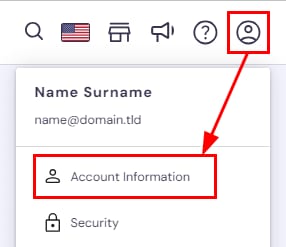
Hostinger account menu with Account Information option highlighted under the profile icon
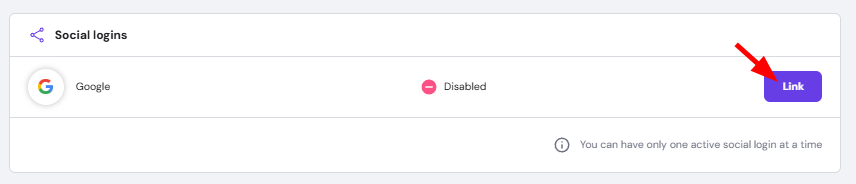
Social logins panel with Google and a Link button highlighted for connecting the account

Hostinger 提供了 social login(社交登录) 功能,允许您使用现有的 Google 凭据轻松访问账户。这种方式能显著提升您账户的安全性

要为您的 Hostinger 账户启用社交登录,请登录 hPanel,点击个人资料图标,选择 Account Information(账户信息)

进入后,向下滚动找到 Social logins(社交登录) 部分。接下来,点击您偏好选项旁边的 Link(关联) 按钮。可用的社交登录选项可能因您购买服务的地区而异。您一次只能选择一个选项

这样就完成了,现在您可以使用所选社交登录账户的相同凭据登录 Hostinger 账户 💪

为了进一步提高安全性,建议您为账户设置 两步验证 💡

来源:Hostinger 官方帮助文档