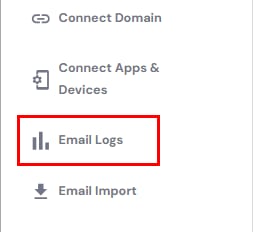
Hostinger email menu with Email Logs highlighted
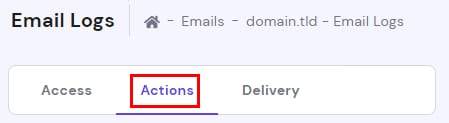
Hostinger Email Logs page with the Actions tab selected
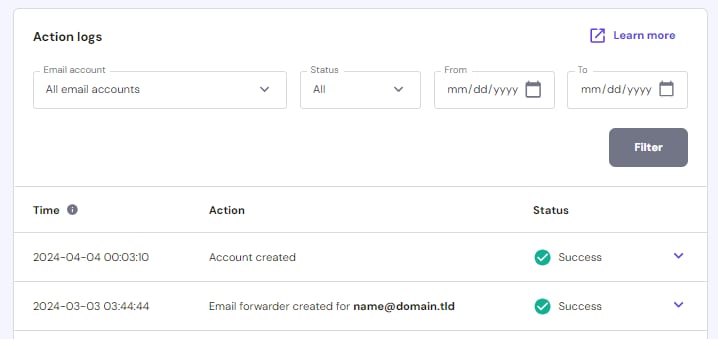
Hostinger Email action logs page showing filters and a table of successful account actions
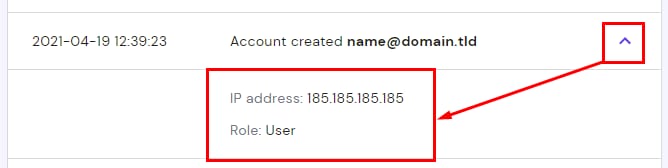
Hostinger email action log entry expanded to show IP address and user role

借助 Hostinger Email 的 Action Logs(操作日志)功能,你可以轻松获取关于 Hostinger 邮件账户所执行操作的详细信息,例如创建邮箱或邮件转发器。进入 Email Accounts 区块,并在左侧边栏选择 Email Logs(邮件日志)

然后选择 Actions(操作) 标签页:

你会看到一个表格,显示操作执行的时间操作类型以及是否成功。你可以按邮件账户、状态(成功或失败)和日期范围进行筛选

你也可以点击任意条目旁边的向下箭头查看额外详情,包括请求的 IP、是用户操作还是系统操作,以及转发器详情:

系统操作的情况下,日志不会包含 IP 地址。

这样,你就知道如何查看邮件操作日志中的所有信息了。

来源:Hostinger 官方帮助文档