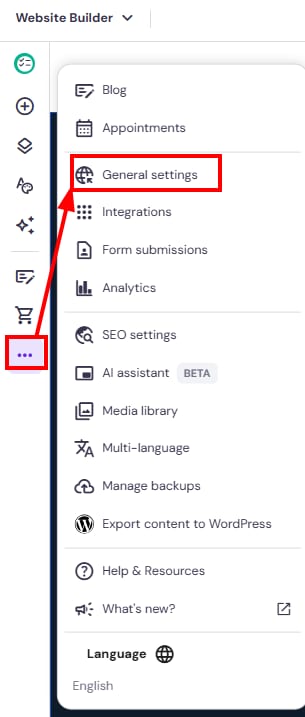
要在 Hostinger 建站工具 中找到网站的常规设置,请点击左侧的 省略号 ⋯ 按钮,然后选择 常规设置(General settings):
在此你可以进行以下操作:
- 添加 网站图标 favicon
- 添加网站的 预览图片
- 启用 Cookie 横幅
- 启用 WWW 前缀
来源:Hostinger 官方帮助文档
要在 Hostinger 建站工具 中找到网站的常规设置,请点击左侧的 省略号 ⋯ 按钮,然后选择 常规设置(General settings):
在此你可以进行以下操作:
来源:Hostinger 官方帮助文档