如果你想要从数据库中移除数据表——例如,在导入一份全新的数据库备份之前——请按照以下步骤操作:
删除数据库表会永久移除数据——请谨慎操作
-
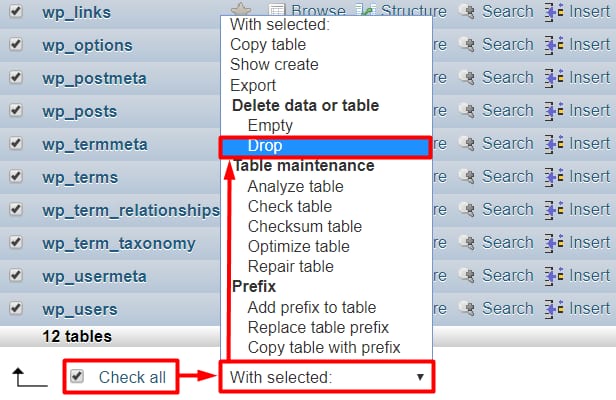
勾选要删除的数据表旁的复选框,或使用 Check all(全选) 复选框选中所有表,然后从下拉列表中选择 Drop(删除):
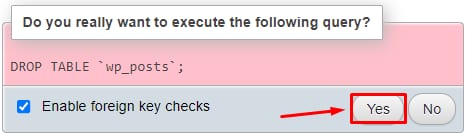
确认操作:
全部完成!现在你的数据库已为空,可以继续向其中导入全新内容 😊
来源:Hostinger 官方帮助文档
如果你想要从数据库中移除数据表——例如,在导入一份全新的数据库备份之前——请按照以下步骤操作:
删除数据库表会永久移除数据——请谨慎操作
勾选要删除的数据表旁的复选框,或使用 Check all(全选) 复选框选中所有表,然后从下拉列表中选择 Drop(删除):
确认操作:
全部完成!现在你的数据库已为空,可以继续向其中导入全新内容 😊
来源:Hostinger 官方帮助文档