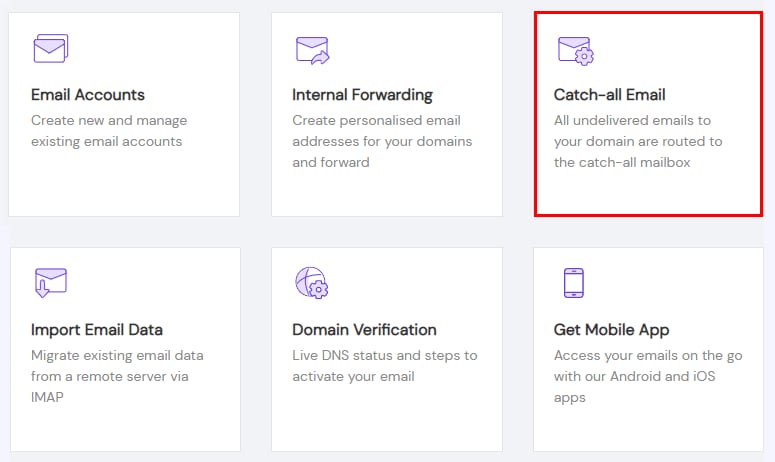
Titan Email catch-all email option highlighted in the Hostinger email tools menu
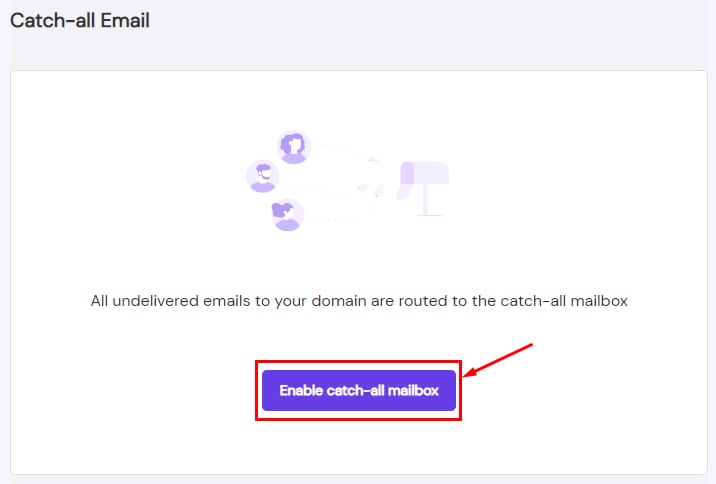
Hostinger Titan Email catch-all email page with the Enable catch-all mailbox button highlighted
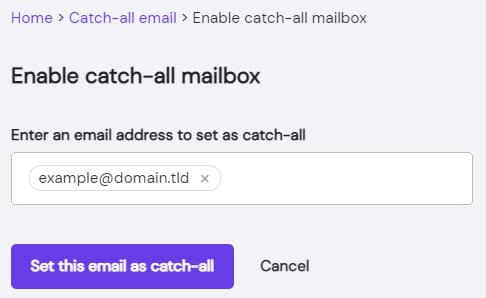
Hostinger Titan Email catch-all setup screen with email address field and Set this email as catch-all button

使用 Titan Email 启用邮件收集功能

邮件收集邮箱(Catch-all email) 是一个强大的工具,可让你捕获发送到拼写错误或无效邮箱地址的任何邮件。

要开始捕获发送到你域名的所有邮件,请进入 Emails 部分,点击相关域名旁边的 管理(Manage),并选择 邮件收集(Catch-all Email)

然后,选择 启用邮件收集邮箱(Enable catch-all mailbox)

最后,指定你想要设为邮件收集的邮箱地址,并点击 将此邮箱设为邮件收集(Set this email as catch-all)

就是这样!邮件收集邮箱现在已为你的域名启用 😊

来源:Hostinger 官方帮助文档