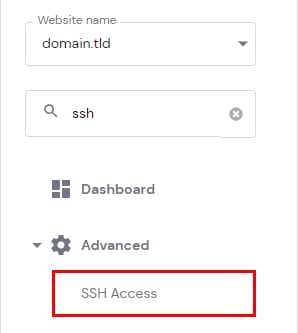
Hostinger hPanel Advanced menu with SSH Access highlighted
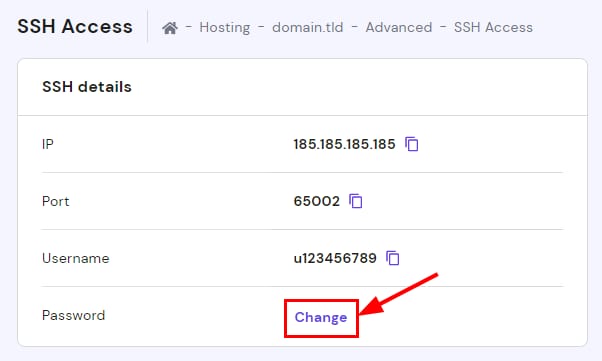
SSH Access page showing the highlighted Change button for the SSH password
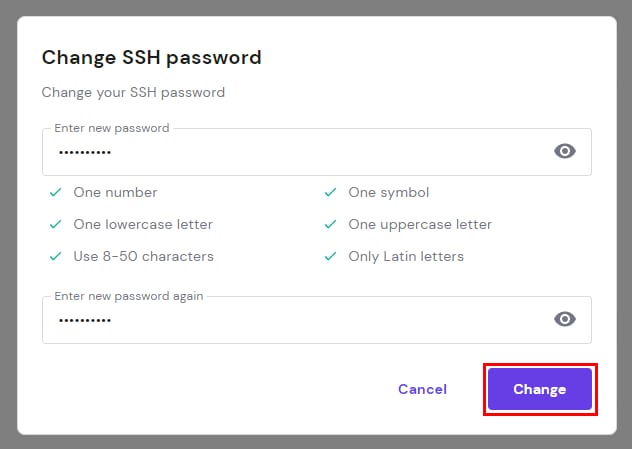
SSH password change dialog with the Change button highlighted

在 Hostinger,SSH 访问适用于 Premium 及以上套餐。

设置主机套餐时你创建了 FTP 密码,该密码同时也是 SSH 密码。若你更改 FTP 密码,它也会自动成为 SSH 密码。

若你希望 SSH 和 FTP 使用不同的密码,可仅在 hPanel 中单独修改 SSH 密码:
在 网站(Websites)部分,点击目标网站旁的“管理(Manage)”,侧边栏找到 SSH Access 并点击。点击 密码(Password)旁的“更改(Change)”,系统会要求生成包含数字、符号、大小写字母的新密码,完成后点击“更改(Change)”即可。

现在你拥有了一个用于 SSH 访问账户文件的新密码。使用 SSH 前请先启用 SSH 访问。

来源:Hostinger 官方帮助文档