
通过 cPanel 允许远程 MySQL 连接
你可以设置远程 MySQL 以远程连接你的数据库。它将允许连接到你的所有数据库,同时仍需对你要连接的具体数据库进行用户名和密码认证。
要启用它,请按以下步骤操作:
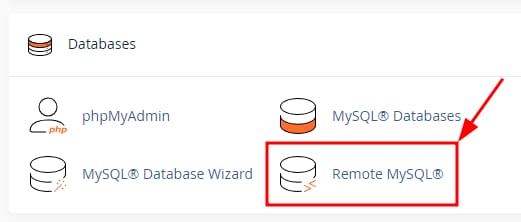
- 访问 cPanel 并进入 Databases 板块中的 Remote MySQL 菜单:
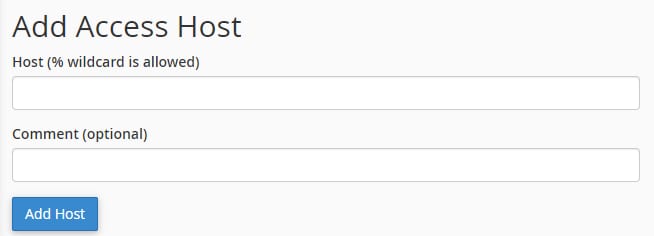
- 接着,在 Host 字段中填写将发起远程连接的 IP 地址。要允许来自任何 IP 的连接,请输入百分号 % 符号。你也可以选择在 Comment 字段中为远程主机添加描述。准备好后,点击 Add Host:
大多数服务器使用负载均衡,因此请求可能来自不同的 IP。因此,建议使用通配符选项(%)。出于安全考虑,你仍需使用数据库用户名和密码进行认证。
完成,新添加的主机会显示在 Manage Access Hosts 板块:
远程连接还需要你指定 MySQL 服务器 主机名——请使用你的主机 IP 地址 的值 💡
来源:Hostinger 官方帮助文档