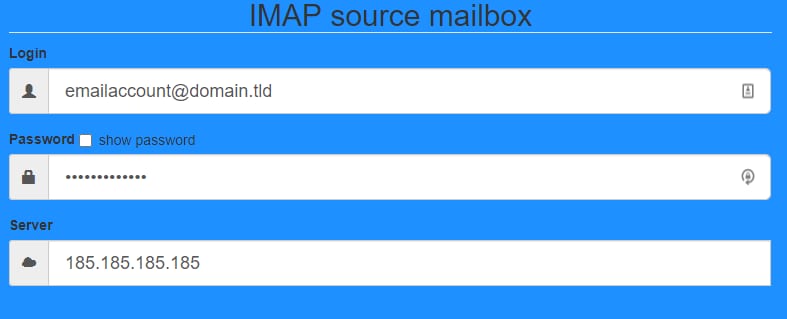

IMAP source mailbox login form with email, password, and server fields
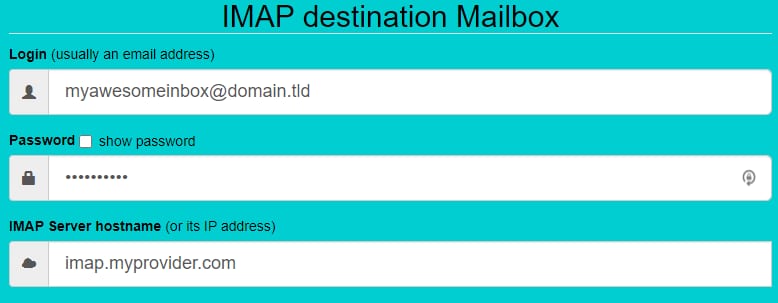
IMAP destination mailbox form with login, password, and IMAP server hostname fields
Sync or resync button in the Hostinger IMAP sync tool with mail icons and arrows

使用 IMAP Sync 迁移你的邮件

如果你要将邮件从其他服务商迁移到 Hostinger,请根据你的具体情况参考以下指南:

如果你是在不同服务商之间迁移(而非迁移到 Hostinger),可以使用 Imapsync 工具协助。

在左侧的 IMAP 源邮箱 中,填写你要迁出邮件的完整邮箱地址、密码以及该邮箱的 IMAP 服务器名称。

在右侧的 IMAP 目标邮箱 中,填写目标邮箱的相关信息。

接着,点击 Sync or resync(同步或重新同步) 按钮:

同步过程可能需要一些时间。请保持页面打开,直到流程结束,以免出现中断。

注意

  • IMAP 同步最多只能传输 3GB。如果你的邮箱超过此限制,可以考虑另一种方式:先使用邮件客户端创建邮件备份,再将其导入到新的邮箱账户中。

来源:Hostinger 官方帮助文档