启用默认被禁用的 PHP 函数:system、exec、shell_exec 等
出于网站安全考虑,我们的 虚拟主机 和 云主机 套餐默认禁用某些 PHP 函数。不过,其中部分函数可以手动启用:
system、exec、shell_exec、passthru、mysql_list_dbs、ini_alter、dl、symlink、link、chgrp、leak、popen、escapeshellcmd、apache_child_terminate、virtual、mb_send_mail、proc_open
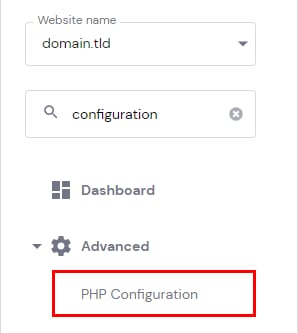
要启用其中任意函数,请进入 网站 → 面板(Dashboard),在侧边栏中搜索 PHP 配置(PHP Configuration) 并点击:
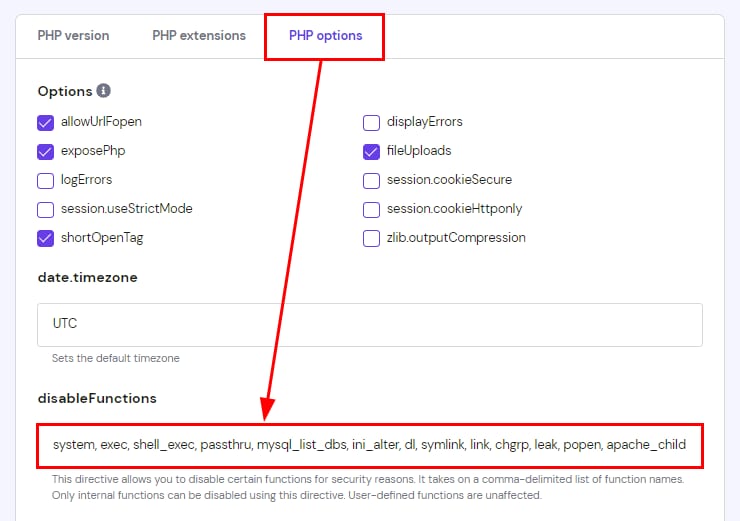
打开 PHP 选项(PHP options) 标签页,向下滚动到 disableFunctions 部分:
你只需从列表中移除所需函数并保存更改。之后你的 PHP 函数就会开始工作 😊
注意:proc_open 默认对所有新创建的账户禁用。现有账户不受影响。如果某个插件或脚本需要 proc_open(包括通过 SSH 运行的 WP-CLI 命令),请使用上述步骤将其从 disableFunctions 列表中移除。
来源:Hostinger 官方帮助文档