通过 FTP 连接网站时遇到错误可能有多种原因。以下是最常见的错误及解决方法:
530 登录不正确(Login incorrect)
连接 FTP 时出现 530 错误通常表示登录凭据不正确。请仔细核对输入的 FTP 信息:
- 若你有多个主机套餐,请确保主机名与你网站所在套餐的 IP 地址一致。
- 确认用户名与你要连接网站相对应:
- 主域名格式通常为 u12345678。
- 附加域(addons)格式为 u12345678.domain.tld。
- 额外 FTP 账户为 u12345678.user 或 u12345678.domain.tld.user。
- 确保输入的是正确的 FTP 密码而非 SSH 密码,且密码前后没有空格。
若确认凭据正确,可尝试重置 FTP 密码并重新连接。
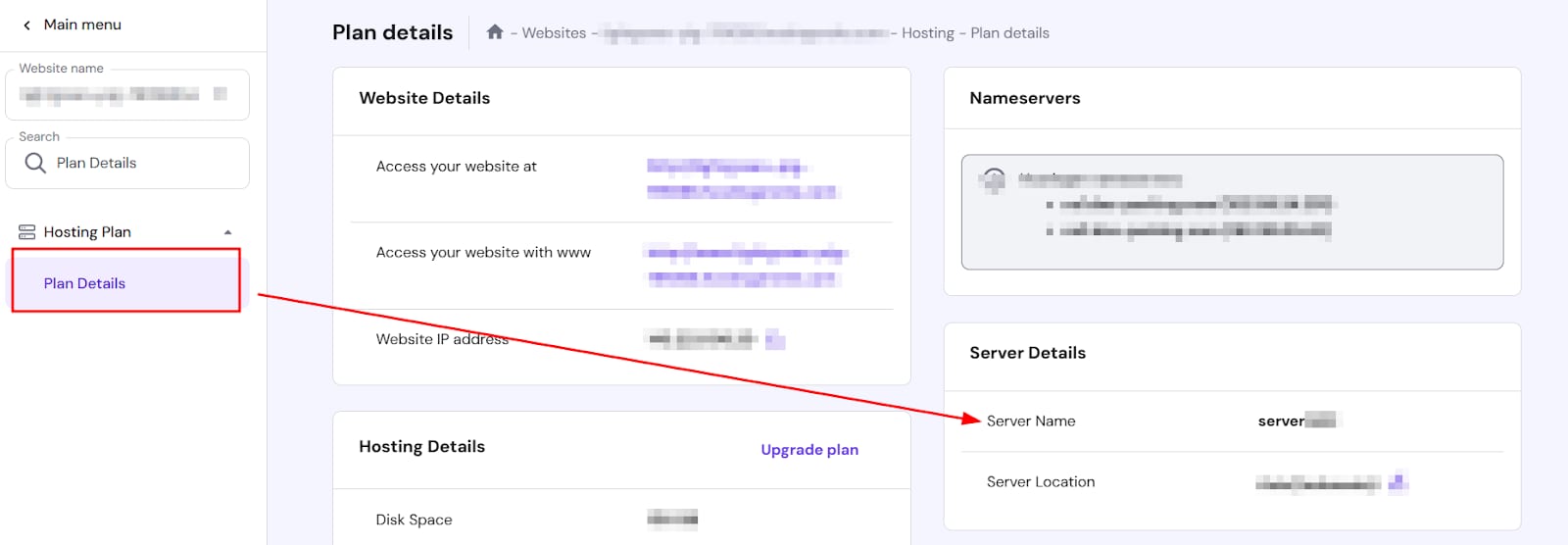
若修改密码后问题仍然存在,应将主机名从 IP 改为服务器名称(server name)。服务器名称可在 hPanel 的 套餐详情(Plan Details) 部分找到。这通常能解决问题。
20 秒或连接超时(connection timed out)错误
该错误通常指向你的网络服务提供商的网络连接问题。可尝试以下操作:
1. 重启路由器及其他网络设备。
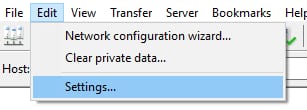
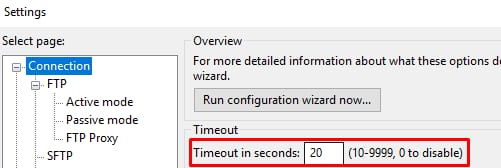
2. 在 FTP 客户端中增大连接超时时间。在 FileZilla 中,进入 编辑(Edit)→ 设置(Settings),将超时时间设为 9999。
若以上步骤后仍超时,请联系你的网络服务提供商寻求进一步帮助。
来源:Hostinger 官方帮助文档