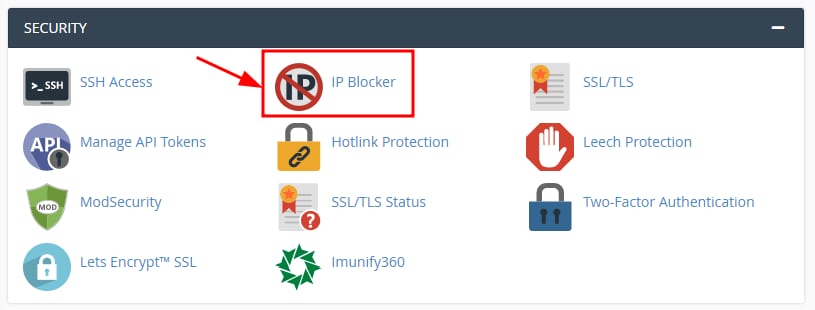
如果你想通过在 cPanel 上封禁某个 IP 地址来限制对其的访问,可以通过 Security → IP Blocker 来实现:
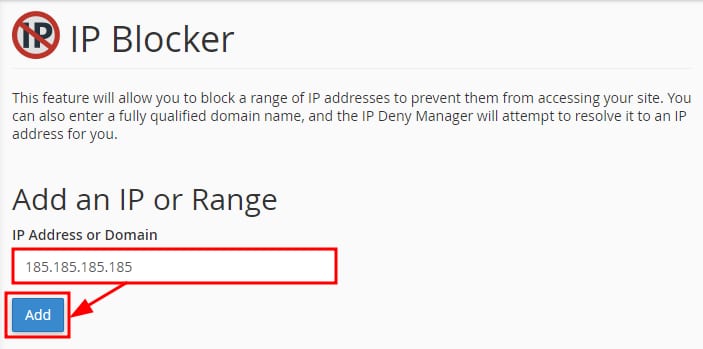
输入你想要封禁的 IP 或 IP 段,然后点击 Add:
添加完成后,来自该 IP 或 IP 段的所有传入连接都将无法访问你的网站。
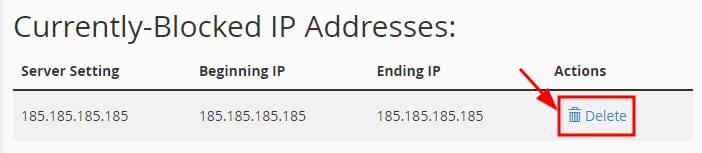
要重新允许访问,只需在同一板块进入 Currently-Blocked IP Addresses 列表,点击 Delete:
将其从封禁列表中移除后,该 IP 或 IP 段将可以再次访问 😊
来源:Hostinger 官方帮助文档
如果你想通过在 cPanel 上封禁某个 IP 地址来限制对其的访问,可以通过 Security → IP Blocker 来实现:
输入你想要封禁的 IP 或 IP 段,然后点击 Add:
添加完成后,来自该 IP 或 IP 段的所有传入连接都将无法访问你的网站。
要重新允许访问,只需在同一板块进入 Currently-Blocked IP Addresses 列表,点击 Delete:
将其从封禁列表中移除后,该 IP 或 IP 段将可以再次访问 😊
来源:Hostinger 官方帮助文档