

“Max Defers” 是邮件主机发送邮件失败时出现的错误信息的一部分。完整的错误信息示例为:
“Domain has exceeded the max defers and failures per hour (5/5 (14%)) allowed.”
这条信息表示邮件发送尝试失败,邮件无法送达预期收件人。
造成此问题的原因有多种,包括:
- 收件人邮箱地址无效(例如拼写错误)
- 目标邮箱域名的 MX 记录无法找到
- 因反复失败触发了反垃圾邮件保护机制
最后一点涉及 cPanel 会自动封锁在短时间内发送多封无效邮件的账户。该行为可能被判定为垃圾邮件活动,从而作为预防措施触发 Max Defers 信息。
在某些情况下,用户即使无意发送垃圾邮件也可能遇到 Max Defers 错误。经检查,往往发现是邮箱地址拼写错误所致。对错误地址的多次发送尝试会导致延迟,最终触发该错误信息。
要排查问题根源,请按以下步骤操作:
- 登录你的 cPanel
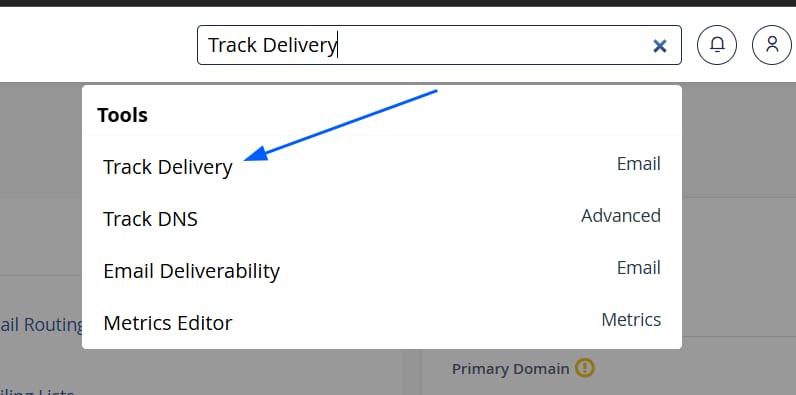
- 在顶部搜索栏输入 “Track Delivery”,并从列表中选择匹配结果。
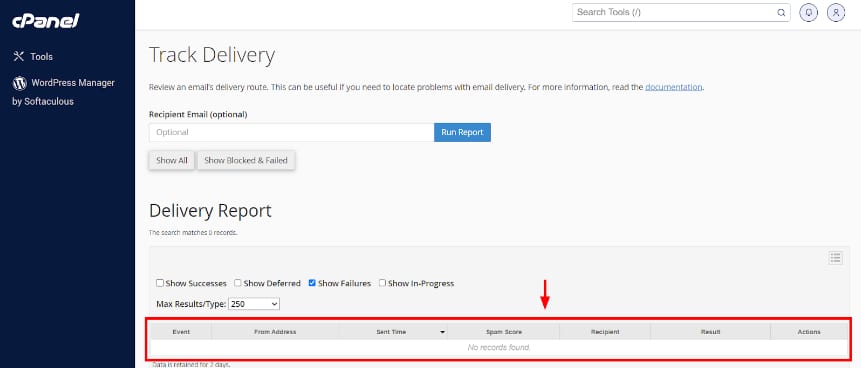
报告会显示在下方表格中。表格内容也可按需筛选。如果只想显示发送失败的邮件,请勾选 Show Failures。
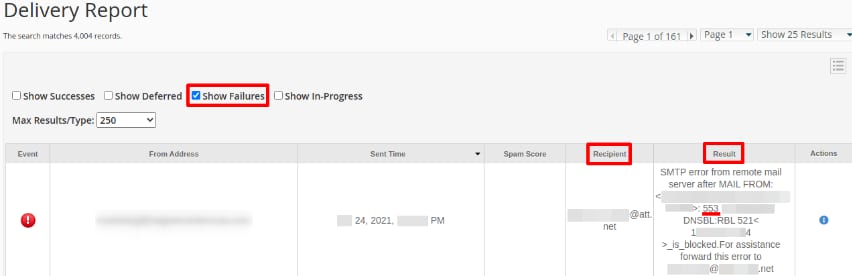
以下是显示发送失败邮件的报告示例。根据该报告,你可以关注以下几点:
- Recipient – 确保收件人地址正确
- Result – 该列会说明邮件发送失败的原因
- Error Code – 你可以在 此链接 查看代码含义
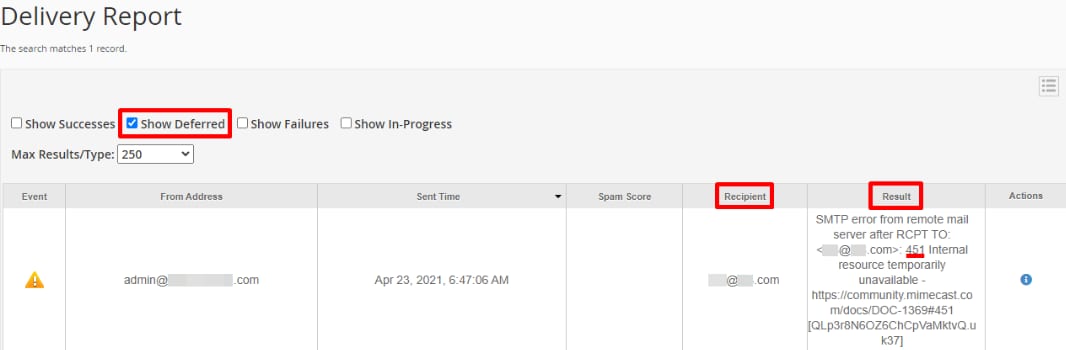
以下是显示延迟邮件的报告示例,操作方法与上述相同。在 Result 列中有 一个错误代码:451 Internal resource temporarily unavailable。
查看错误代码及其含义后,以我们的示例为例,其含义为:
- 451 | Internal resource temporarily unavailable
- 说明:发送邮件服务器受到灰名单限制,需要服务器在 1 分钟到 12 小时之间重试连接。或者,发件人的 IP 地址信誉较差。
-
建议解决方案:可通过 Auto Allow 或 Permitted Senders 策略绕过这些信誉检查。如果是合法流量,请修改你的灰名单策略。
-
Track Delivery 上的邮件送达状态
以下图标表示邮件的送达状态:
| 状态 | 含义 |
|---|---|
| 成功 | 系统已成功送达该邮件。 |
| 未知 | 邮件状态未知,或正在送达中。 |
| 延迟 | 系统已延迟该邮件。 |
| 错误 | 邮件遇到送达错误。 |
| 归档 | 系统已归档该邮件。 |
| 拒绝并删除 | 系统因 SMTP 问题拒绝并删除了该邮件。这可能发生在发送服务器未使用安全配置,或被列入实时黑名单(RBL)时。 |
| 未入收件箱 | 邮件服务器已接收该邮件,但未将其投递到收件人收件箱。这可能发生在收件人的软件或邮件过滤器拦截了该邮件时。 |
现在你已经了解了通过邮件主机发送邮件时该错误信息的可能成因,可以使用 cPanel 中的 Track Delivery 工具查看邮件活动,并根据错误代码的建议解决方案找出合适的处理方法。
来源:Hostinger 官方帮助文档