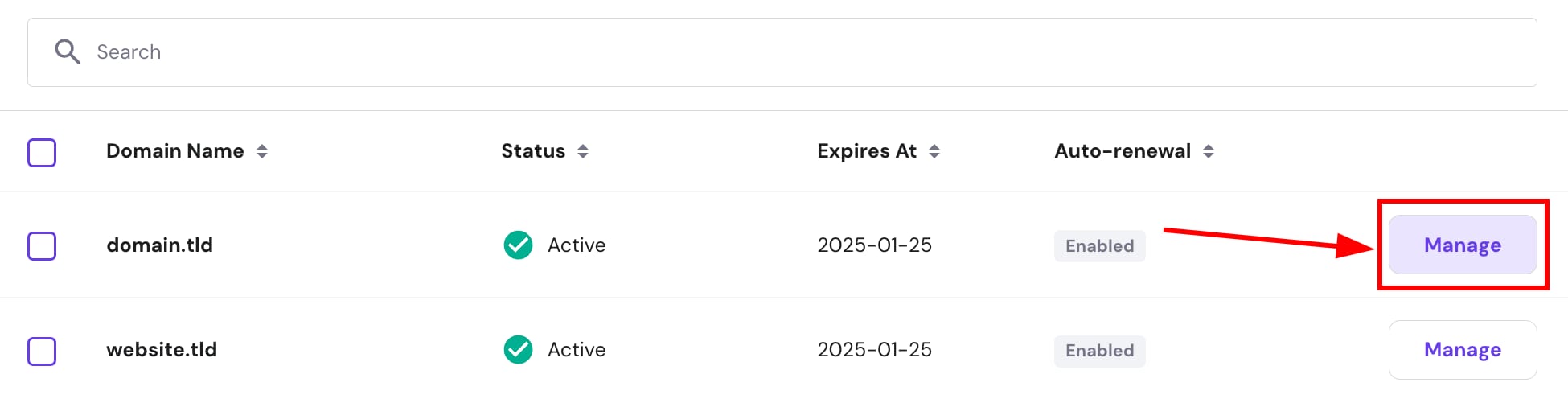
Hostinger domains list with the Manage button for domain.tld highlighted
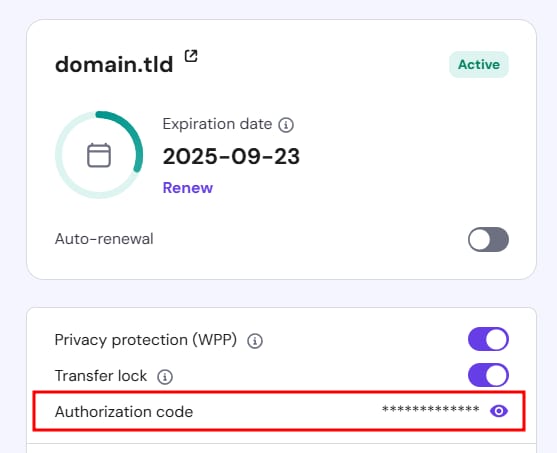
Hostinger domain settings showing the Authorization code field highlighted

获取从 Hostinger 购买的域名的 EPP 或授权码。

如果你希望将域名从 Hostinger 转移到其他服务商,你很可能需要一个授权码(EPP 码)来验证该域名属于你。

部分 TLD 有特殊的转移要求——请通过以下文章了解更多:

对于其他域名后缀,你可以通过进入 hPanel 的 Domains(域名) 部分,并点击要转移的域名旁的 Manage(管理) 来获取转移授权码

该代码会显示在 Domain Overview(域名概览) 部分,名为 Authorization code(授权码)——点击眼睛图标即可查看:

获得代码后,在满足以下要求的情况下,你可以发起域名转移:

  • 自域名注册或转移以来已过去超过 60 天
  • 域名已解锁
  • 隐私保护 已禁用

你要转移到的服务商可能有额外要求,因此你也可以事先联系他们 💡

来源:Hostinger 官方帮助文档