将你的 Google Workspace 邮件 Business Starter 方案升级到 Standard 或 Plus。
如果你在 Hostinger 使用的是 Google Workspace 邮件 Business Starter 方案,并且希望获得更多存储空间和更强的功能,你可以将邮件账户升级到 Business Standard 或 Business Plus。
升级的优势
- 视频会议的参与人数增加,并具备录制和降噪能力:Business Standard 最多 150 人,Business Plus 最多 500 人。
- 预约预订页面。
- 邮件版式与邮件合并功能。
- 更多存储空间:每个邮件账户在 Business Standard 下为 2 TB,在 Business Plus 下为 5 TB。
- 使用 Business Plus,你可以获得额外的安全与管理控制,包括 Vault 以及高级端点管理。
如何升级
升级会应用于你当前 Google Workspace 邮件方案中的所有邮件账户;不支持升级单个邮箱。
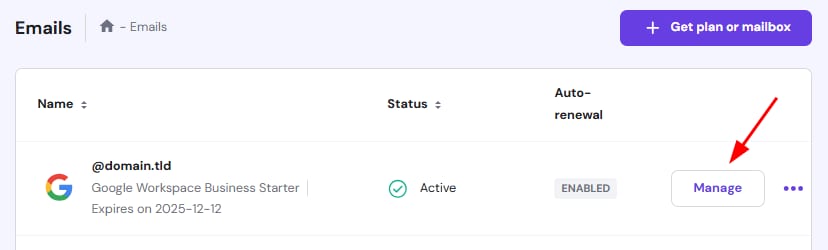
打开 hPanel 的 邮件(Emails) 部分,点击你域名旁边的 管理(Manage):
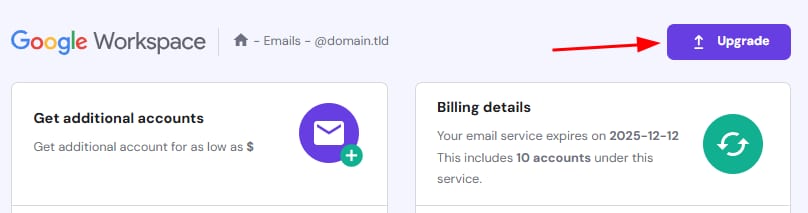
进入后,点击 升级(Upgrade) 按钮:
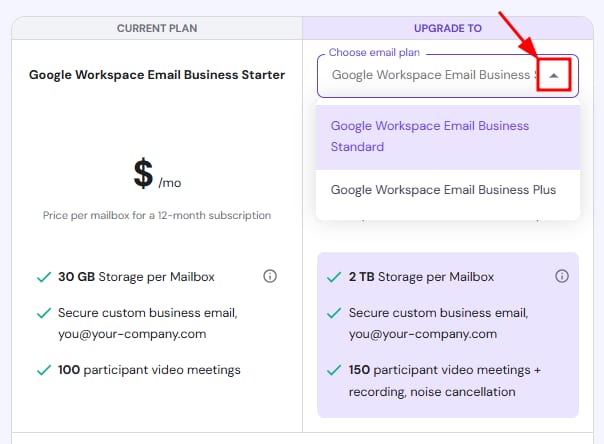
在升级页面,从下拉列表中选择你所需的方案:
在同一页面,你还可以在需要时添加更多邮箱,并选择你偏好的支付方式。一切设置完毕后,点击 完成升级支付(Complete Upgrade Payment) 以完成流程。
注意
- 方案附带固定的功能和存储上限,无法自定义。
额外资源
- 退款政策
来源:Hostinger 官方帮助文档