在 Hostinger,你只需点击几下即可轻松创建和管理数据库。
点击下方试用交互式演示:Launch demo(启动演示)
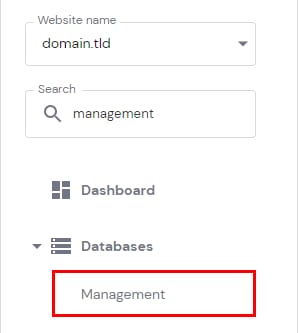
要创建新数据库,请前往 Websites(网站) → Manage(管理),在侧边栏中找到 Management(管理) 并点击:
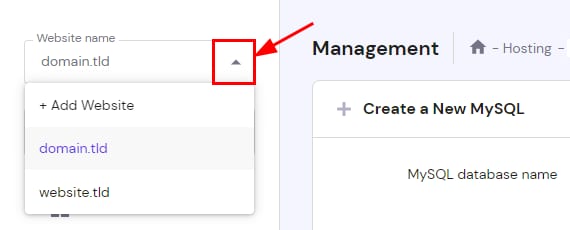
接下来,确保左侧下拉菜单中已选择要绑定该数据库的网站:
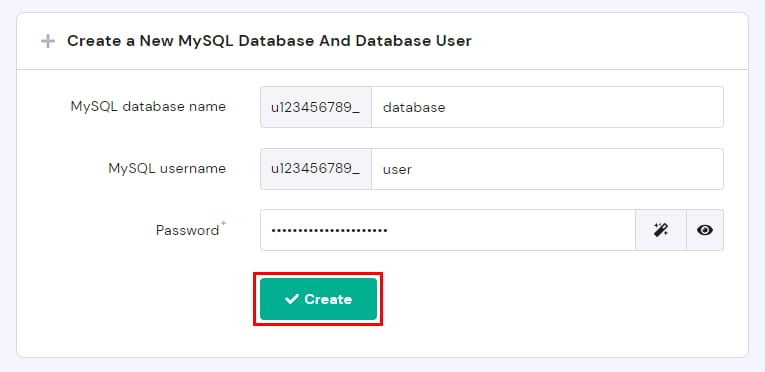
在 Create a New MySQL Database And Database User(创建新的 MySQL 数据库及用户) 部分,输入数据库名称、用户名和密码,并注意以下事项:
-
数据库与用户名的前缀部分(例如 u123456789)是唯一的,无法删除或更改
-
每个数据库只能有一个用户。如需多个用户,请考虑 VPS 计划
-
数据库密码必须包含至少一个数字、一个大写字母和一个小写字母,且最小长度为 8 个字符
然后点击 Create(创建):
完成后,新数据库会自动绑定到所选域名,并显示在 List of Current MySQL Databases And Users(当前 MySQL 数据库及用户列表) 部分,你可以在此处对其进行管理。
来源:Hostinger 官方帮助文档