SSL(Secure Sockets Layer,安全套接层)是一种安全协议,利用先进的加密技术来保护通过互联网传输的敏感信息。
它的主要作用是在用户的浏览器与所要连接的网站服务器之间,建立一条安全、加密的通信通道。
你可以在下方以及本视频教程中了解更多相关内容:
安全网站与非安全网站的区别
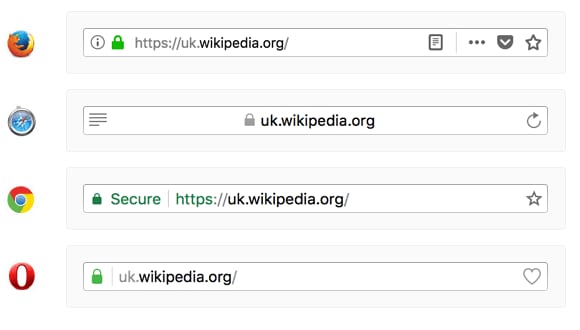
识别安全网站很简单——查看地址栏中网址旁边显示的锁形图标即可。其外观可能因你使用的浏览器而略有不同:
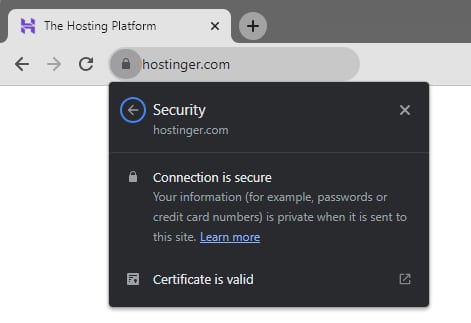
点击锁形图标并选择 连接是安全的(Connection is secure),即可查看该 SSL 证书的更多详细信息:
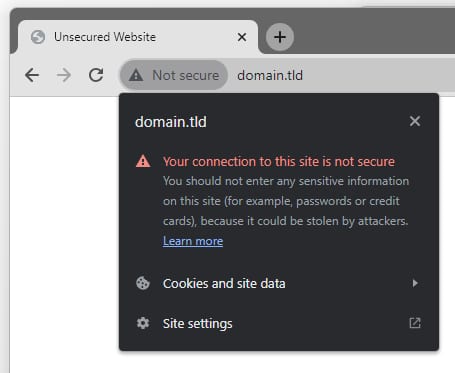
另一方面,没有 SSL 证书的网站在大多数浏览器中会被标记上警告图标,并显示为 不安全(Not secure):
每个网站都需要单独的证书吗?
域名验证(DV)证书(例如 Lifetime SSL)非常适合一次保护一个域名或子域名;我们的 Web 和 Cloud 主机套餐已为你的所有网站免费包含此类证书。
如果你使用的是 VPS 主机,则可以从可信的供应商处购买通配符或多域名 SSL,并安装以保护你的全部网站。
如何获取显示公司名称的证书
![SSL certificate details showing a valid certificate issued to GMO GlobalSign, Inc. [US]](../../images/ssl-certificates/1583278-introduction-to-ssl-at-hostinger_4.jpg)
若要获得在地址栏中显示公司名称的证书,你可以从可信供应商处购买扩展验证(Extended Validation,EV)证书,并安装到你的网站上,以增强用户信任与安全性:
通过部署 SSL 加密,你将保护用户的数据,并为网站访客提供可信赖的访问体验。
💡 了解更多:
- 如何获取 SSL 证书:在 Hostinger 安装免费的 Lifetime SSL 证书
- SSL 如何保护你的网站
来源:Hostinger 官方帮助文档