在 Hostinger 一站式查看你的主机信息
你可以在同一位置找到主机套餐的所有基本信息。进入 hPanel 的 Websites(网站) 板块,点击你网站旁边的 Dashboard(控制面板)。
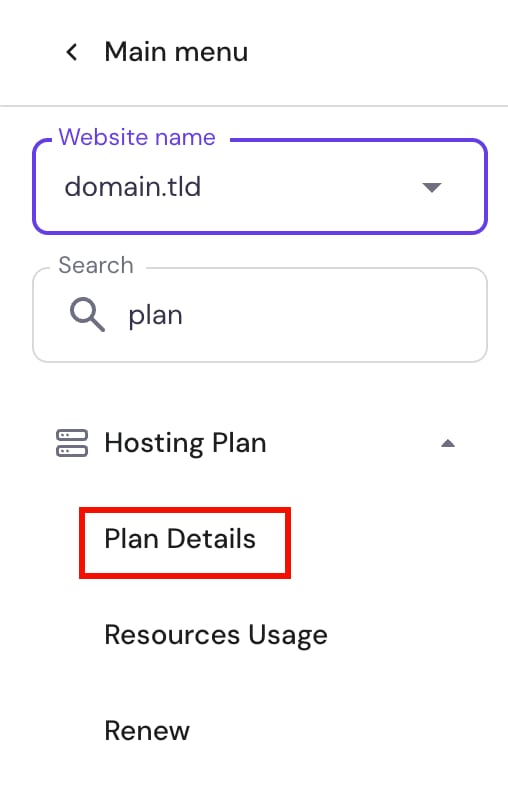
进入 Websites 页面后,在左侧边栏中找到 Hosting plan(主机套餐) → Plan Details(套餐详情):
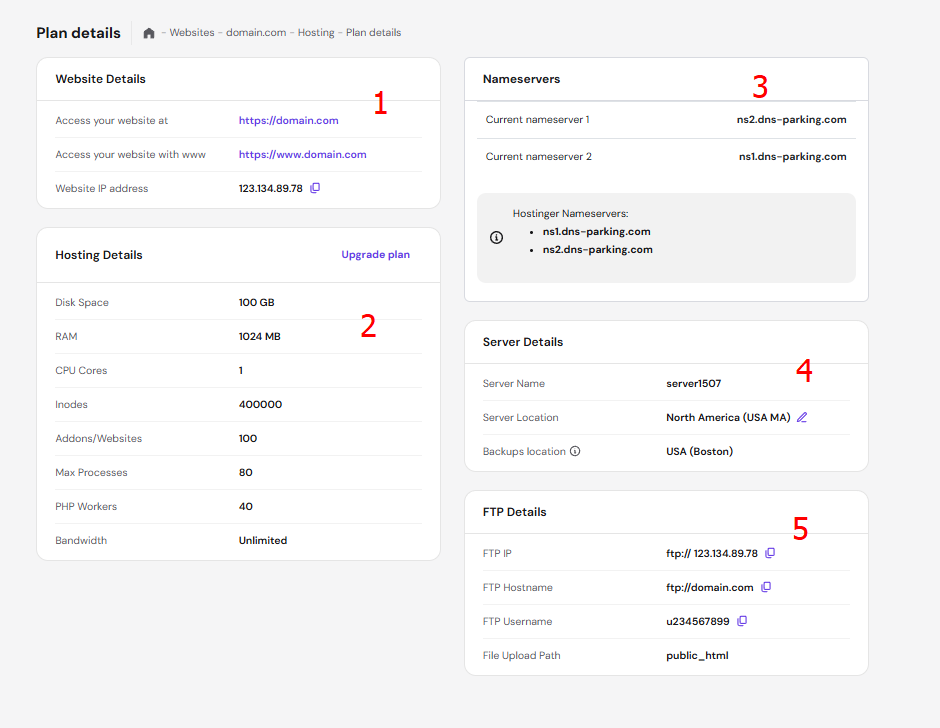
套餐详情页面包含以下内容:
- 网站详情(Website Details) —— 你的域名以及网站的 IP 地址。
- 主机详情(Hosting Details) —— 主机套餐的主要限制,以及方便升级的链接。
- Nameservers(域名服务器) —— 你域名当前的 NS 记录以及 Hostinger 的对应值。如果你的域名是在其他地方注册的,请务必查看如何将域名指向 Hostinger。
- 服务器详情(Server Details) —— 服务器的名称与位置、更改服务器位置的选项,以及备份所在位置。
- FTP 详情(FTP Details) —— 通过 FTP 连接账户所需的信息。
来源:Hostinger 官方帮助文档