通过 Hostinger 将域名指向 Weebly,请确保在指向之前你拥有一个活跃的 Weebly 账户。

一旦你拥有了账户,就可以通过以下方式将域名指向那里:

第 1 步 – 在 Weebly 上更改域名

Hostinger Settings menu item highlighted in the top navigation bar
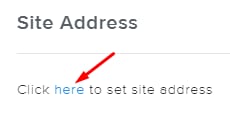
Site Address section with the "here" link highlighted for setting the site address
Hostinger domain search bar with the “connect or transfer it now” link highlighted
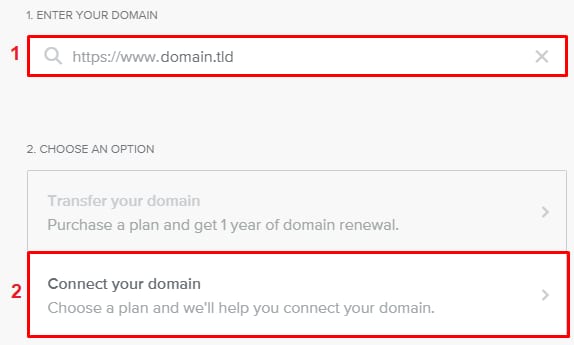
Hostinger domain setup screen with the Connect your domain option highlighted

要查找所需的 A 记录,请进入 Settings(设置) 部分:

设置 Site Address(站点地址)

插入你的域名,并点击 connect or transfer it now(立即连接或转移它)

再次输入你的域名,并点击 Connect your domain(连接你的域名)

现在,购买首选的 Weebly 订阅。完成后,你将收到所需的 A 记录。

第 2 步 – 创建一条 A 记录

一旦你从 Weebly 获得 A 记录,请将其添加到你域名的 DNS 区域

创建 A 记录后,DNS 传播 将开始。此过程最多可能需要 24 小时。在此期间,你的网站预计无法工作,但请给它一些时间,它很快就会上线。

就是这样!现在你知道如何将域名连接到 Weebly 了。

注意

来源:Hostinger 官方帮助文档