如果你的套餐为 Web Premium 或更高版本,可通过 SSH 访问主机。SSH 访问范围限定在你的主目录及其以下。
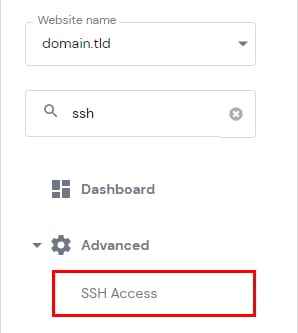
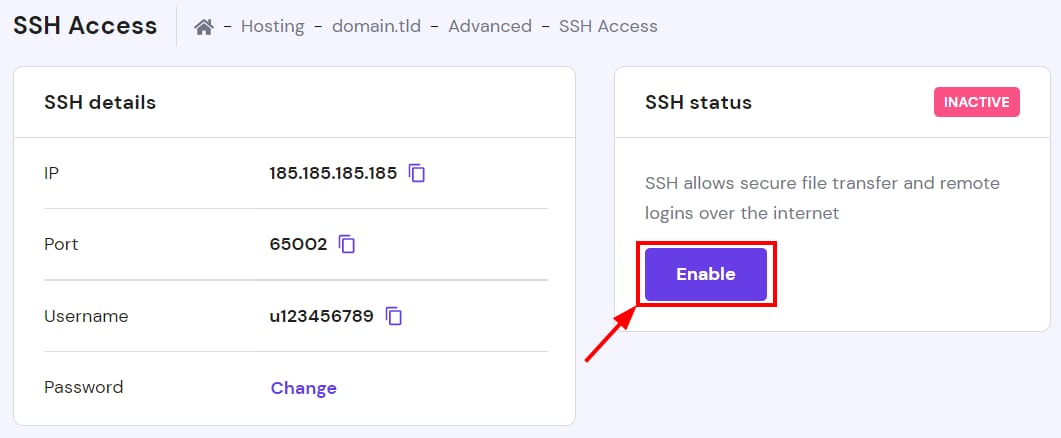
建立 SSH 连接前,需先启用:进入 网站(Websites)→ 面板(Dashboard),侧边栏找到 SSH Access 并点击,在 SSH 状态处点击“启用(Enable)”即可。
若你是 Single 套餐且确实需要 SSH 访问,可考虑升级套餐。
来源:Hostinger 官方帮助文档
如果你的套餐为 Web Premium 或更高版本,可通过 SSH 访问主机。SSH 访问范围限定在你的主目录及其以下。
建立 SSH 连接前,需先启用:进入 网站(Websites)→ 面板(Dashboard),侧边栏找到 SSH Access 并点击,在 SSH 状态处点击“启用(Enable)”即可。
若你是 Single 套餐且确实需要 SSH 访问,可考虑升级套餐。
来源:Hostinger 官方帮助文档