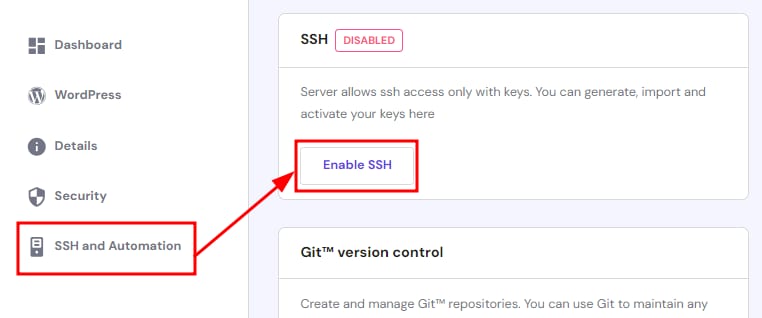
cPanel menu with SSH and Automation selected, showing Enable SSH button and SSH disabled status
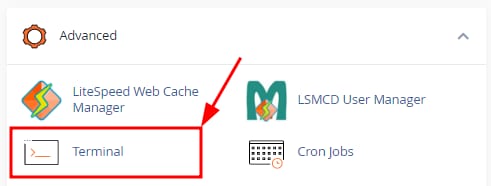
Hostinger cPanel Advanced section with Terminal option highlighted
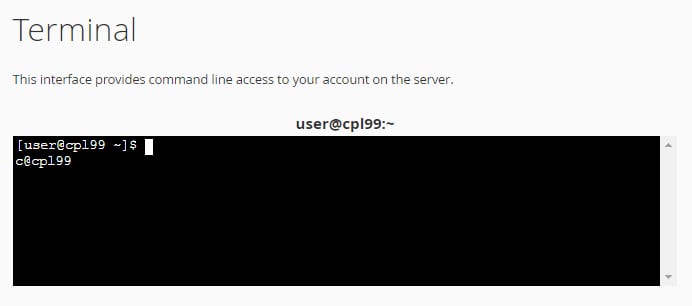
Hostinger cPanel terminal showing command-line prompt user@cp199~

SSH 访问 适用于共享 cPanel 主机套餐,你可以使用 cPanel 自带的 Terminal 轻松连接。

首先,要启用 SSH 访问,请登录你的 Hostinger 账户,进入 hPanel 的 Home 页面,点击 cPanel 套餐旁的 Manage

在侧边栏中选择 SSH and Automation,点击 Enable SSH

接下来,进入你的 cPanel,向下滚动到 Advanced 标签页,或使用搜索栏找到 Terminal

如果出现 警告,点击继续,即可进入命令行:

在这里你可以使用 SSH 命令 来管理你的账户 😊

来源:Hostinger 官方帮助文档