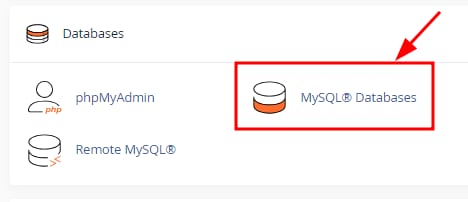
cPanel Databases section with MySQL Databases option highlighted
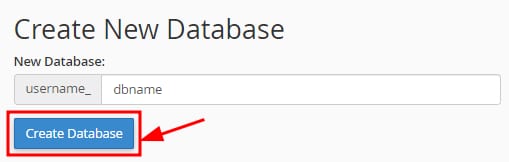
cPanel Create New Database page with Create Database button highlighted
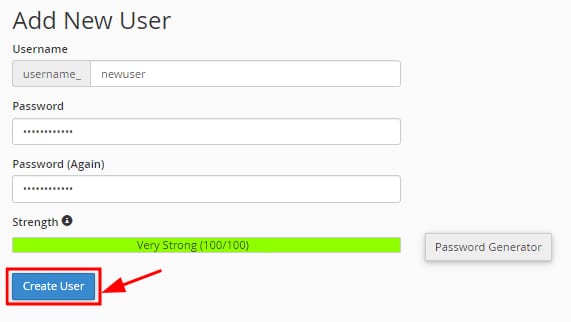
cPanel Add New User form with the Create User button highlighted
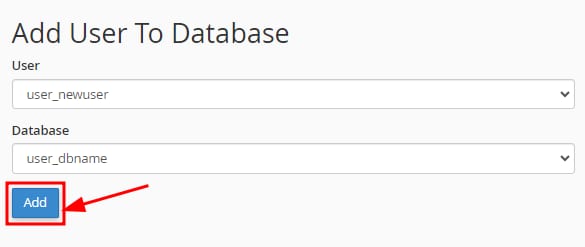
Hostinger cPanel dialog to add a user to a database, with the Add button highlighted

在 Hostinger 使用 cPanel 创建新的 MySQL 数据库

你可以轻松创建新的 MySQL 数据库,方法是打开 cPanel 并点击 MySQL Databases 板块:

进入后,输入数据库名称并点击 Create Database

默认情况下,前缀将是你的 cPanel 用户名加下划线,例如 user_

创建数据库后选择 Go Back,并向下滚动到 Add New User 板块,注意以下事项:

  • 用户名将使用与数据库相同的前缀
  • 输入数据库密码两次。密码长度至少必须为 10 个字符,否则数据库连接将失败。建议使用密码生成器工具以确保使用强密码,因为它生成的密码已满足此最小长度要求

接着,点击 Create User

最后,在下方 Add User To Database 板块,将你新创建的用户与数据库关联。从下拉列表中选择用户和数据库,然后点击 Add

完成!你的 MySQL 数据库将创建成功,并正确关联了用户。

如果你遇到 “database connection failed” 错误,很可能是数据库密码少于 10 个字符。请将密码更改为至少 10 个字符以解决此问题。

来源:Hostinger 官方帮助文档