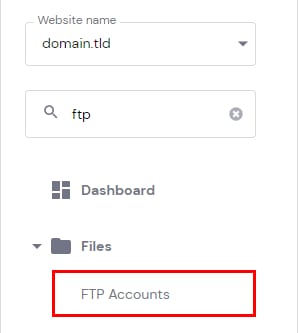
Hostinger hPanel sidebar with FTP Accounts highlighted under Files
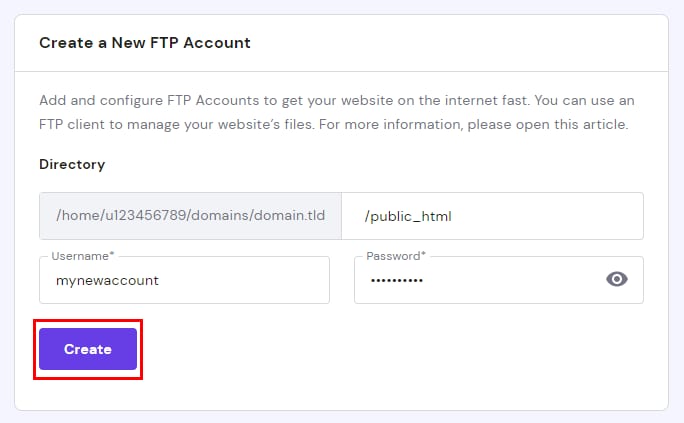
Hostinger FTP account form with the Create button highlighted
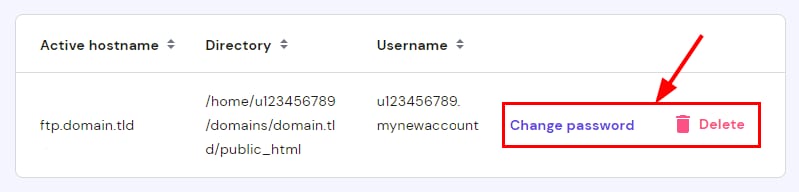
Hostinger FTP account row with the Change password and Delete actions highlighted

虽然设置主机账户时默认会创建一个 FTP 账户,但当有多个用户需要访问网站文件时,创建多个 FTP 账户非常有用。你还可以限制新账户仅能访问特定文件夹。

注意:使用 Hostinger 建站工具(Website Builder)创建的网站不支持 FTP。

创建新 FTP 账户:进入 网站(Websites)→ 面板(Dashboard),在侧边栏找到 FTP Accounts 并点击。

在页面底部会出现“创建新 FTP 账户(Create a New FTP Account)”区域,你可在此指定新 FTP 账户的自定义目录、用户名和密码。

注意:若希望 FTP 账户能访问网站根目录,请将目录保留为 /public_html。

创建后,你可以删除 FTP 账户或修改其密码。

来源:Hostinger 官方帮助文档