在 Hostinger,你有两种方式在 cPanel 中访问邮箱账户以及邮箱管理选项:
-
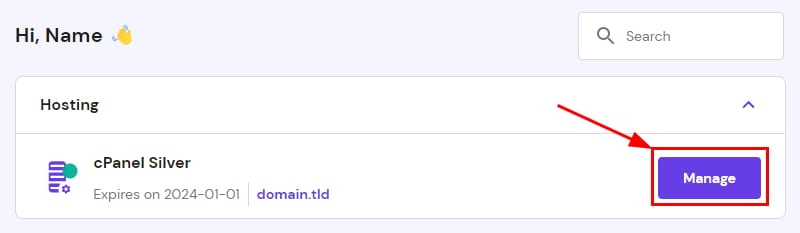
在 hPanel 主页 点击 cPanel 套餐旁的 Manage:
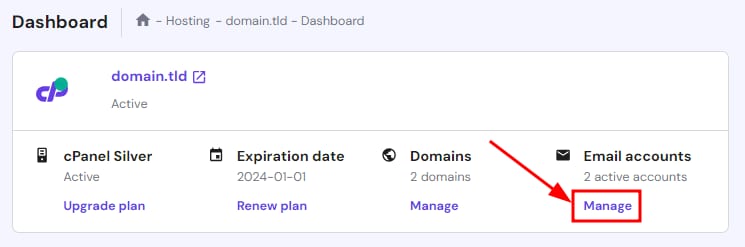
然后,在 cPanel 控制面板中点击 Email accounts 下方的 Manage: -
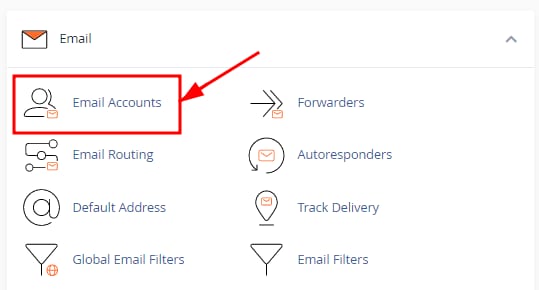
或者,在 cPanel 内部,进入 Email → Email accounts 板块:
两种方式都会进入 cPanel 的 Email Accounts 板块,你可以在那里看到所有邮箱账户的列表,以及以下邮箱管理选项:
- 创建或删除 邮箱账户
- 访问 webmail 查看邮件
- 获取 邮箱账户配置信息,用于设置邮件客户端或连接设备
- 更多选项,点击邮箱账户旁的 Manage:
- 重置邮箱账户密码
- 更改邮箱账户的存储空间配额
- 启用或禁用邮件服务
- 释放邮箱存储空间的工具
- 以及跳转到其他板块,如 邮件过滤器 和 自动回复
完成!现在你已经知道如何访问 cPanel 邮箱 📬
来源:Hostinger 官方帮助文档