如果你的网站托管在 Hostinger,并收到 max_connections_per_hour 限制相关的错误:
Connection failed: User 'u1000000_database' has exceeded the
'max_connections_per_hour' resource (current value: 500)
你可以尝试以下方法:
方法一——使用 localhost
确保网站 配置文件(例如 wp-config.php)中的数据库主机名设置为 localhost。
不建议将数据库主机名设置为你的托管 IP。
例如,如果你当前的数据库配置如下:
/** The name of the database for WordPress */
define( 'DB_NAME', 'u1000000_database' );
/** MySQL hostname */
define( 'DB_HOST', '185.185.185.185' );
请将 DB_HOST 最后一行的值替换为 localhost,如下所示:
/** The name of the database for WordPress */
define( 'DB_NAME', 'u1000000_database' );
/** MySQL hostname */
define( 'DB_HOST', 'localhost' );
方法二——停止进程
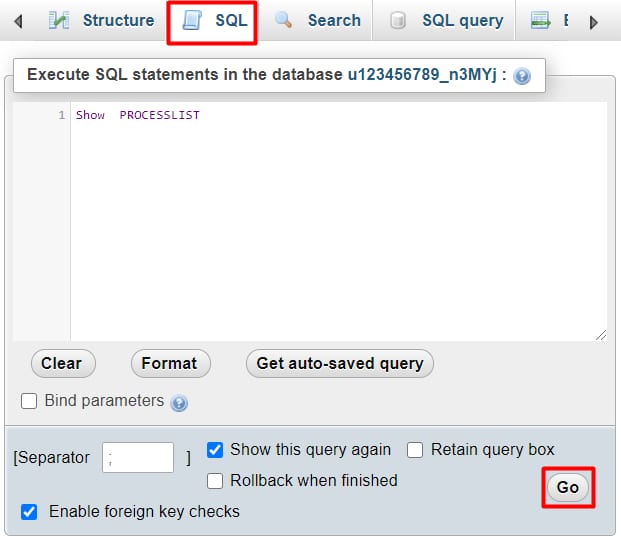
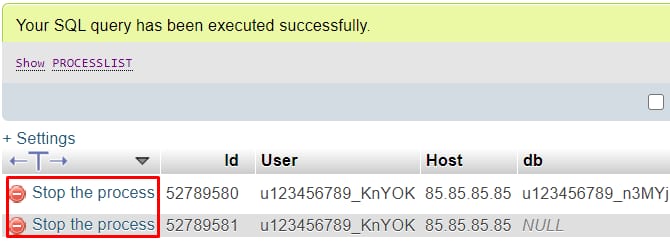
网站上某些未优化的代码可能导致你达到 max_user_connections 限制。要解决它,你可以按照以下步骤手动终止这些连接:
-
点击顶部菜单中的 SQL,输入 SHOW PROCESSLIST 并点击 GO(执行):
-
完成后,会生成当前进程列表。你可以点击 Stop the process(停止进程) 来逐个停止:
请注意,停止进程只能暂时缓解问题。要获得更持久的解决方案,你需要优化数据库查询或 升级你的套餐 🚀
来源:Hostinger 官方帮助文档