Hostinger hPanel Databases menu with Management option highlighted
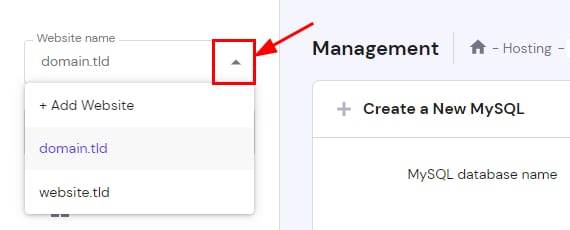
Hostinger panel website selector dropdown arrow highlighted in the MySQL management page
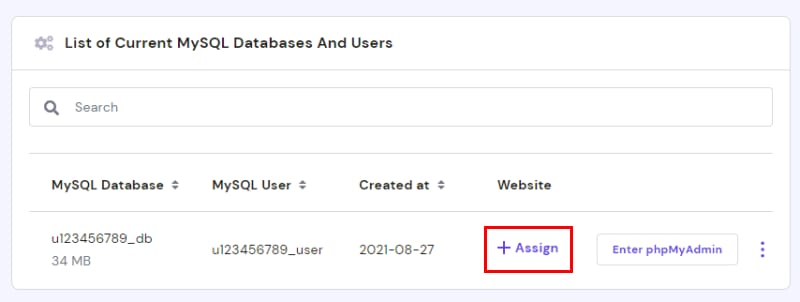
Hostinger MySQL databases list with the Assign button highlighted in the Website column
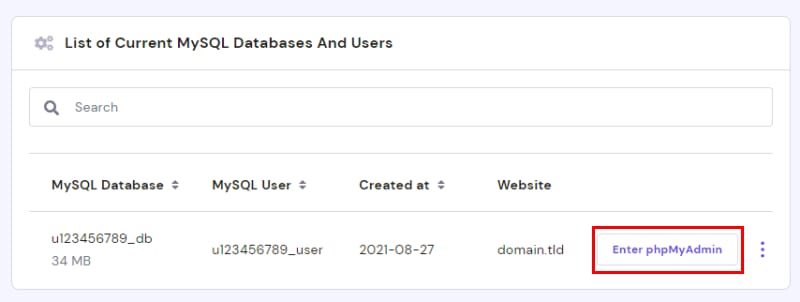
Hostinger MySQL databases list with the Enter phpMyAdmin button highlighted
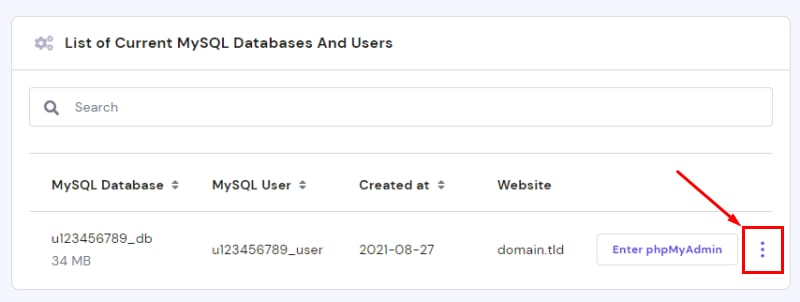
Hostinger MySQL database list with the phpMyAdmin menu button highlighted on the right
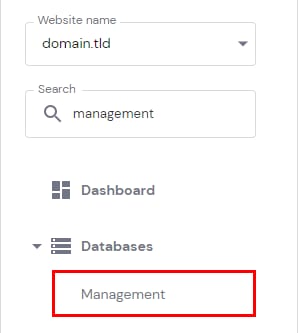
MySQL 数据库可以在 hPanel 的 Databases(数据库) 部分进行管理。要访问它,请前往 Websites(网站)Dashboard(仪表盘),在侧边栏中找到 Databases Management(数据库管理) 并点击:

进入后,你可以从左侧下拉菜单中选择网站,以显示其关联的数据库:

你会看到 List of Current MySQL Databases And Users(当前 MySQL 数据库及用户列表) 部分。请注意,所有新建数据库都会绑定到所选域名;如果某个数据库尚未绑定网站,你可以点击 Assign(绑定) 来完成绑定:

要通过 phpMyAdmin 访问数据库内容,请点击 Enter phpMyAdmin(进入 phpMyAdmin)

如需更多选项,请选择目标数据库并点击 按钮:

你可以执行以下操作:

  1. 修复数据库——它会分析并优化数据库表,确保数据库运行正常

  2. 更改 当前数据库密码

  3. 更改 各项权限

  4. 彻底删除 数据库

相关资源

来源:Hostinger 官方帮助文档