修改 upload_max_filesize、max_input_vars 和其他 PHP 参数
以下信息不适用于使用 Hostinger 网站构建器 创建的网站 💡
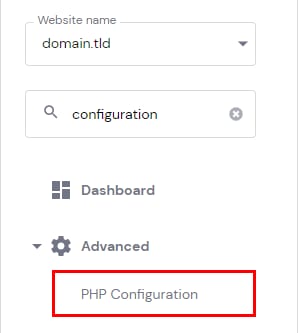
要更改大量 PHP 参数的值,请进入 网站 → 管理(Manage),在侧边栏中搜索 PHP 配置(PHP Configuration) 并点击:
然后,选择 PHP 选项(PHP Options) 标签页。在基本选项下方,你可以定义多个参数的值,例如 时区、已禁用函数 和各项限制:执行时间、文件上传、输入时间、内存限制等。
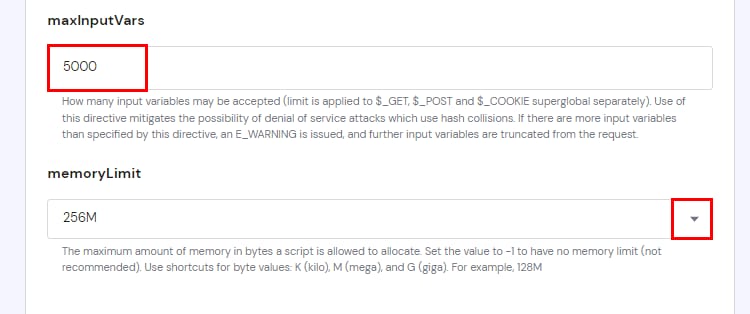
要为限制设置新值,请输入所需的值,或在可用时从下拉列表中选择:
注意
- 你只能设置等于或低于你的主机套餐限制的值。如果设置了更大的值,将应用你主机套餐的最大值。
- 你可以在 PHP 信息页面 上查看限制和其他 PHP 配置信息。
- 本页面上未列出的 PHP 参数可以 通过 .htaccess 文件更改。
来源:Hostinger 官方帮助文档